Showing posts with label Google. Show all posts

Google's Super Bowl advert is quite cute!

I saw Google's Super bowl Advert on you tube today and it made me feel quite tearful to be completely honest!I am a HUGE Google fan,infact at collage my nick name is Google because......Well I really don't know why the call me google but I don't mind it.


Hopefully I will find the lady of dreams soon and will be able to use Google to get her,or I might just find her on google it's self....Not likely!

How to get your facebook Events onto google calander.

Welcome to this on-his-mind guide on how to sync your facebook events to your Google calendar.This is very easy and if you follow these instructions step by step you will have no problems at all.

You might be thinking"why would I want to do this?" well there are multiple reasons,one being that if you a user of Google calendar you want to know exactly when somthing is and not have to move back and forth between google calendar and facebook to find out.You want everything in one place so that you can organise and collaborate your schedule with others.

There are a couple of things you will need to do this,these things are as follows:
A facebook account.
A Google account.

1.Log into facebook,Once you are logged in click on Settings > Applications Settings.

2.A list of applications will show up,find the "events"application and click on it.
3.A list of all your events will show up.Now click on"export events" which is on the top of the page next to the explore events link.if you cant find it look directly under the profile button ;)
4.A box will appear that looks like the following:

Copy the link which is in that box and then go to your google calendar.
5.in Google calendar under the"other calander"box click add then add by URL.

6.A white box will appear which looks like a search box.In this box you must past the link you got from facebook.It will look something like this:

Click add.

You have successfully transferred all your events to Google docs!

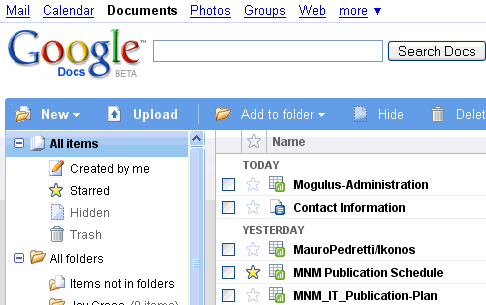
Google Docs-Web-based office software that you cant live without.


Have you ever asked yourself what you would do without Google? Well I have, and the answer is nothing, without Google I would do nothing. I use almost every Google application I can get hold of and one of those is a nice little thing called Google docs.

Google Docs is an online word processor, spreadsheet, presentation, and form application Hosted by Google for free. Google Docs allows you to create documents and then edit them on the site. You can also upload Microsoft office documents onto Google docs and you will be able to edit them in Google docs as well as save them. You are then able to access them at any time elsewhere with an internet connection.

A Google doc also has a feature that allows you to collaborate your documents. This means that you can share your docs with your friends or co workers and all parties can edit the document at the same time.

You can access Google docs on your mobile phone and you can send documents vie email. You can also download the documents to your PC so you can open them in Apps like Microsoft office and open office. If I have important Documents that I want to backup I often upload them to Google docs and save them there.

The Google docs interface is almost exactly the same as office is but the fact that you can save data online and access it from both work and home is just awesome.

If you would like to find out more about Google docs go the wiki page on it at http://en.wikipedia.org/wiki/Google_Docs
Or if you would like to watch online tutorials on how to do things and more go to
http://www.expertvillage.com/video-series/4204_google-documents.htm

Stick around wile we uncover more online office tools just like Google docs!