Last.fm-Listen to any music aswell as radio online for free.


Last.fm is a music website based in the United Kingdom. Last.fm is an internet radio station and music community site. The web site has over 30 million active users from over 200 countries making it the world’s largest social music platforms around today. On 30 May 2007, CBS Interactive acquired Last.fm for $280m USD.

Last.fm uses an advanced program called audioscrobbler, this program builds a detailed profile of each user's musical taste by recording details of all the songs the user listens to. It does this by checking what music you are listening to on last.fm or by taking music from your audio devise and then identifying what music you listen to. Audioscrobbler then takes all the information it has of you and automatically finds out what you might like and then creates a music profile for you.

After you have registered users can create a custom Radio station with all their favorite music and share it with the world.

If you want to listen to music off the internet this site is for you! You can find new bands that are similar to bands you like and then say if you like them or not. If you looking for a new band or want to listen to the latest album last.fm will be able to find it and have it.

Because of the advanced features on last.fm and the easy to use service this site has made it into the on-his-mind best sites online list!

For more information on last.fm please go to http://en.wikipedia.org/wiki/Last.fm
To go to the last.fm web site please go here http://www.last.fm/

Microsoft office live-Microsoft's Web-based office software


A few days ago we featured a site called Google docs which is an online based office tool. Because of goggles success in their web based tool Microsoft followed suit creating a similar service for their Live members called office live.

Office live is almost a replica of Google docs. Office live allows live members to store and share Microsoft office documents on the internet. This is very handy for backing up important data or if you want to accesses it on another computer through the internet. The sharing feature allows you to share a document with other users, you do this by selecting the user yourself. This means that you choose who sees your files and who doesn’t.

Office live consists of two services namely Office Live Workspace and Office Live Small Business In this article we are going to describe to you exactly what the difference between the two services are, we do this so you can decided which one will fit your needs.

We are first going to start with Office live workspace. As mentioned above office live workspace’s main feature is that it allows users to store and share documents online anywhere in the world for free. You can access your office live workspace vie the internet ether using their website or directly from Office Word, Excel and PowerPoint by installing an Office Live Update extension .Although you can view documents online you cannot change or edit them on the site, instead you have to download the document onto your pc and then edit it in the correct office client for example word or excel. With office live workspace you get up to 5 Gigabits of storage, this means you don’t have to carry a flash stick or CDs around with you but instead all you have to do is upload data to the site and then when it needs to be accessed elsewhere all you do is login to your Office live account and download them.

The biggest disadvantage to using office live workspace is the fact that you can’t edit the files online like other online web based office software like Google docs.


Office Live Workspace

Office Live Small Business
Microsoft Office Live Small Business is an Internet-based service that allows users to create a professional looking website without needing any knowledge of design or technical skills.

Office live small business has multiple features for people that are wanting to create and own a website. These features change often and price structure may be implemented at any time. For these reasons we do not go into it thoroughly.

You can access office live from the following link http://www.officelive.com/

In my opinion Google docs is much more better and powerful because you can do everything on the site itself and you don’t have to download extenuations for office and you can edit docs online from anywhere whether you have office installed or not.For these reasons office live ARE NOT on ow best sites online list.

If you would like to find out more about both Office live small business and office live workspace visit the wiki page at http://en.wikipedia.org/wiki/Office_Live

The 2rd best online FPS of all time-call of duty 4


Welcome to the 4th instalment on the top 5 online games of all time! In this article you will find out what game we think is the 2nd best online FPS of all time!

2. Call of duty 4

Call of duty 4:modern warfare also known as COD4 developed by Infinity Ward and published by Activision for Mac OS X, PlayStation 3, Windows, and Xbox 360 is an amazing online FPS! The game was first released in November 2007 and is the 4th Call of duty game.

It toke the COD4 developers 2 years to complete using a proprietary game engine. Call of Duty 4 features team-based and death match-based multiplayer modes on various maps. Each mode has an objective that requires unique strategies to complete. Players can change their guns as they unlock new ones and then upgrade their guns and mod them too exactly how they want them.

In call of duty 4 if you get a certain amount of deaths without dying you can do certain things like call in air strikes and much more.

If you are looking for an action packed game that is easy to get into and has a huge competitive gaming scene then COD4 is the Online FPS game for you.

For more information on owe 2nd best FPS online game of all time please go to http://en.wikipedia.org/wiki/Call_of_Duty_4

Stay with us while we count down to the Top online FPS game ever made and played!

Google Docs-Web-based office software that you cant live without.


Have you ever asked yourself what you would do without Google? Well I have, and the answer is nothing, without Google I would do nothing. I use almost every Google application I can get hold of and one of those is a nice little thing called Google docs.

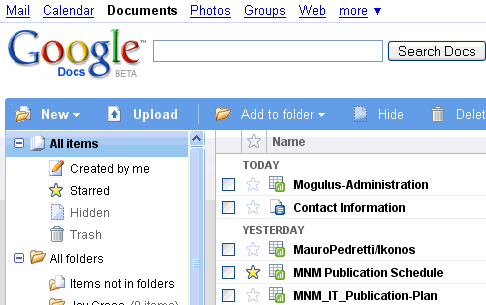
Google Docs is an online word processor, spreadsheet, presentation, and form application Hosted by Google for free. Google Docs allows you to create documents and then edit them on the site. You can also upload Microsoft office documents onto Google docs and you will be able to edit them in Google docs as well as save them. You are then able to access them at any time elsewhere with an internet connection.

A Google doc also has a feature that allows you to collaborate your documents. This means that you can share your docs with your friends or co workers and all parties can edit the document at the same time.

You can access Google docs on your mobile phone and you can send documents vie email. You can also download the documents to your PC so you can open them in Apps like Microsoft office and open office. If I have important Documents that I want to backup I often upload them to Google docs and save them there.

The Google docs interface is almost exactly the same as office is but the fact that you can save data online and access it from both work and home is just awesome.

If you would like to find out more about Google docs go the wiki page on it at http://en.wikipedia.org/wiki/Google_Docs
Or if you would like to watch online tutorials on how to do things and more go to
http://www.expertvillage.com/video-series/4204_google-documents.htm

Stick around wile we uncover more online office tools just like Google docs!